
If you’re looking for a simple way to receive USDC on Accrue in Ghana, this guide walks you through everything you need to know.
If you want to accept payment in digital dollars, fund your account faster, or manage your money more flexibly, learning how to deposit USDC on Accrue is a useful skill.
Accrue allows users in Ghana to receive USDC directly into their crypto wallet inside the app. The process is quick, but one detail matters more than anything else: choosing the correct network. If the wrong network is used, your funds may be lost.
In this article, you’ll learn how to receive USDC on Accrue in Ghana step by step, how long it takes for the deposit to reflect, what you can do with your funds, and the most common mistakes to avoid.
What Is USDC?
USDC is a digital dollar, also known as a stablecoin. It is designed to maintain a value close to 1 US dollar, which makes it popular for payments, savings, transfers, and crypto-based funding.
Many people use USDC because it offers a more stable alternative to volatile cryptocurrencies. If you’re in Ghana and want to receive funds in dollars digitally, using USDC on Accrue can be a convenient option.
Why Use Accrue to Receive USDC in Ghana?
There are several reasons people choose to receive USDC on Accrue in Ghana:
- It makes it easier to receive digital dollar payments
- It gives you access to a crypto wallet inside the Accrue app
- Your deposit can reflect quickly once detected on-chain
- You can use the funds for withdrawals, swaps, and virtual card funding
If you regularly receive payments from abroad or prefer holding value in dollars, using an Accrue USDC wallet in Ghana can help you manage funds more easily.
How to Receive USDC on Accrue in Ghana
Follow these steps to deposit USDC on Accrue:
1. Log in to your Accrue account
Open the Accrue app and sign in to your account.
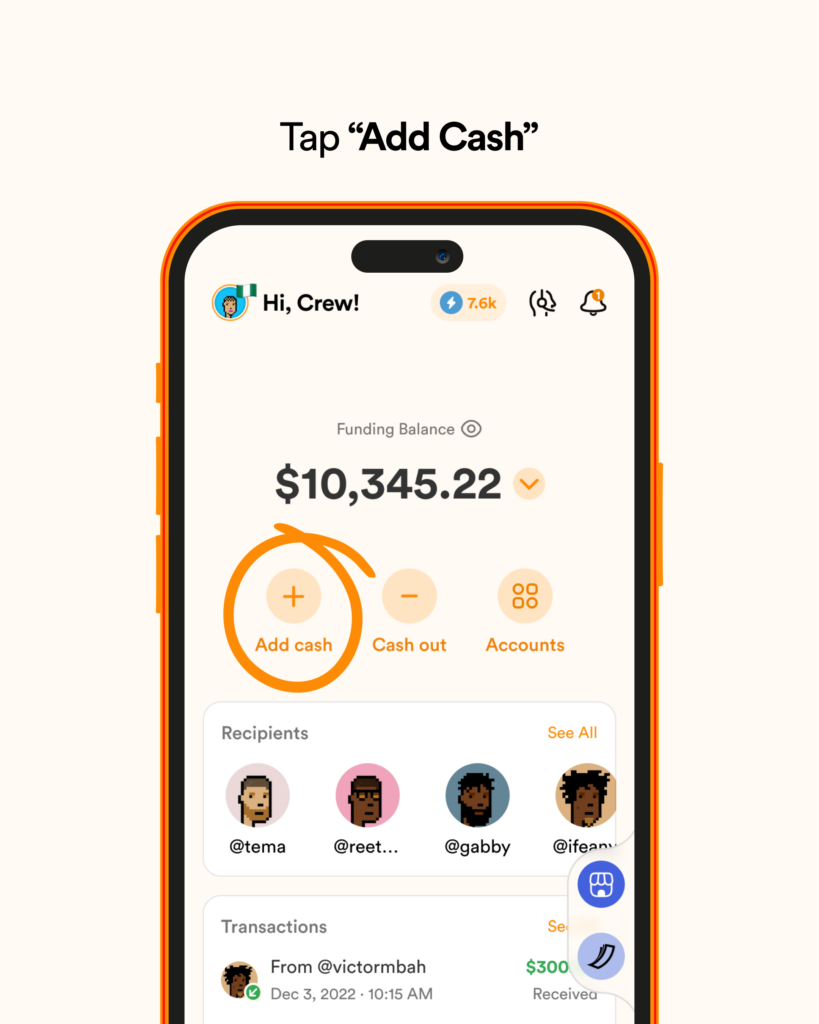
2. Tap “Add Cash”
From your dashboard, click or tap the Add Cash icon.
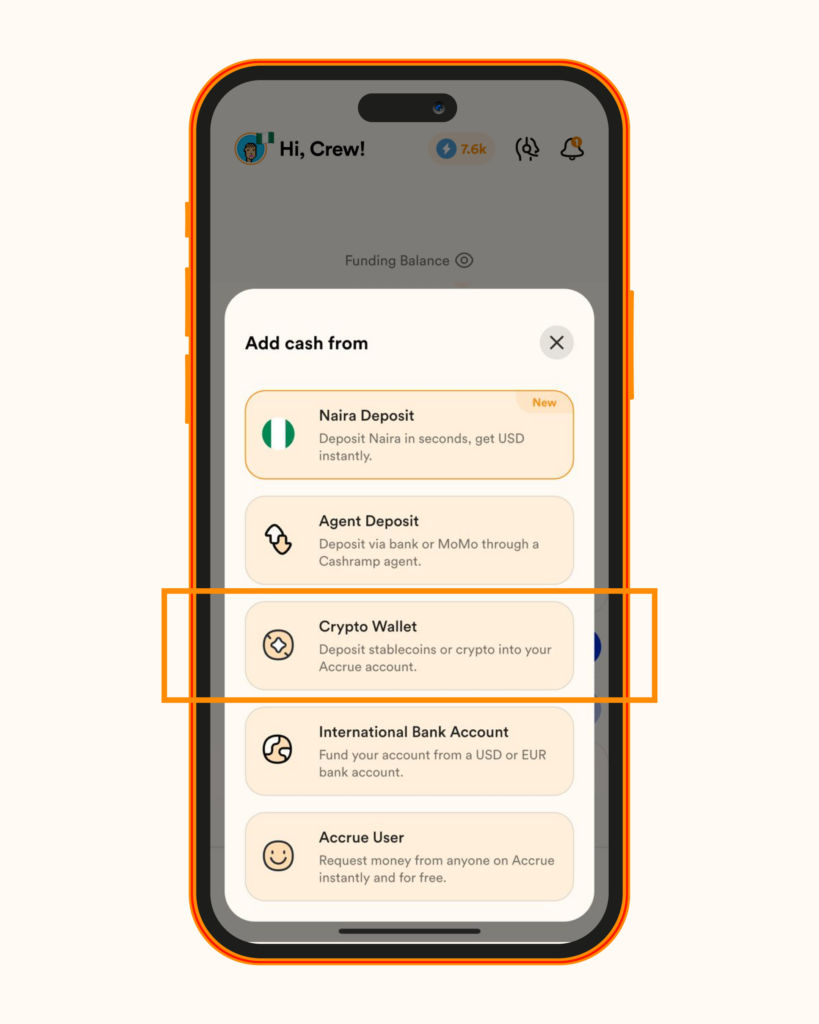
3. Select “Crypto Wallet”
Choose the Crypto Wallet option from the available funding methods.
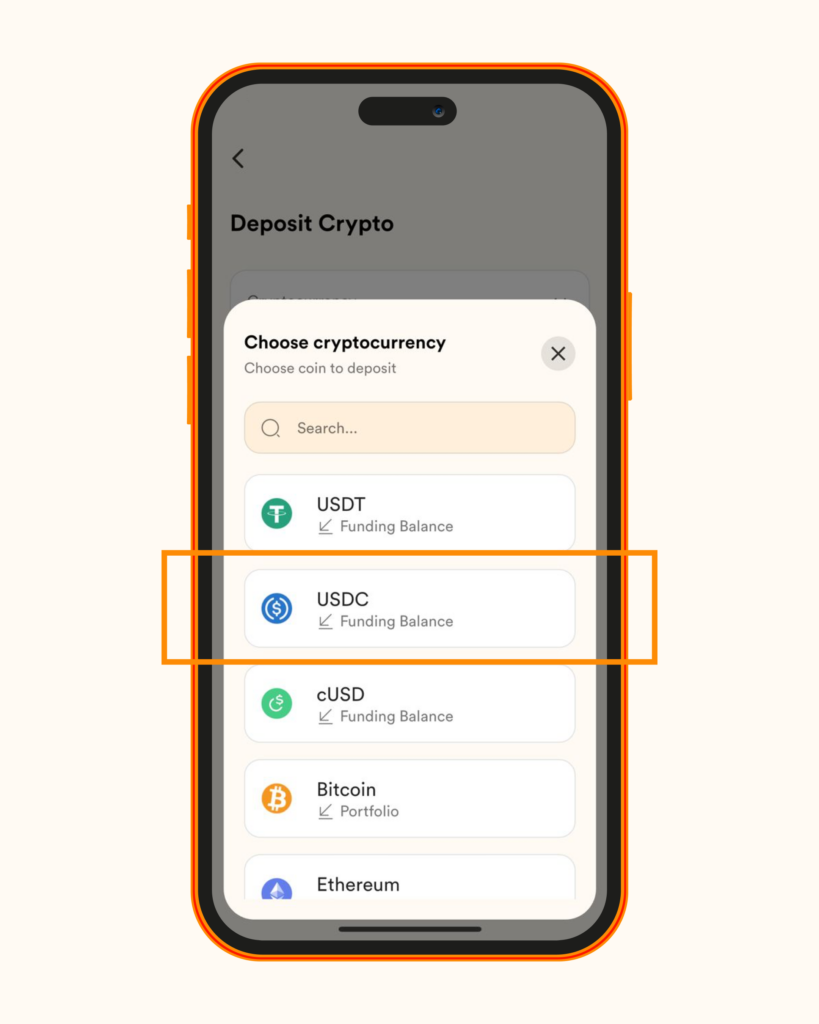
4. Choose USDC
From the list of supported cryptocurrencies, select USDC.
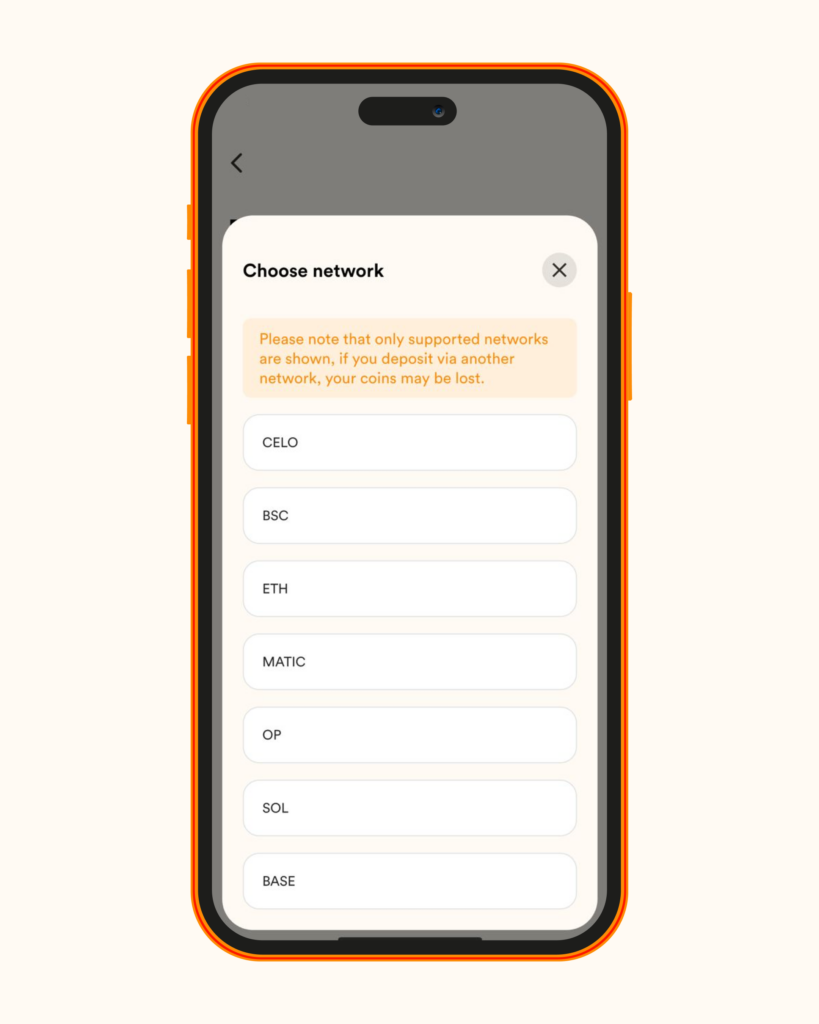
5. Select your preferred network
You’ll be shown the supported networks available for receiving USDC. Pick the network you want to use.
6. Copy your wallet address
Once you select a network, Accrue will generate your USDC wallet address. Copy it carefully.
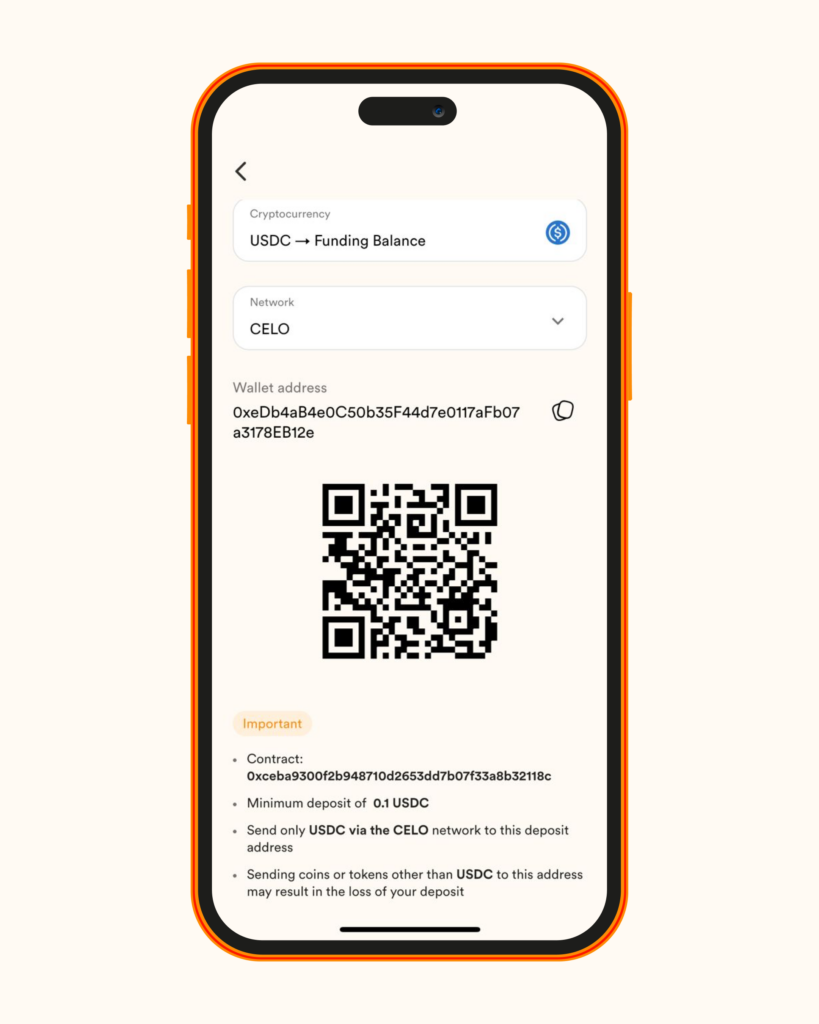
7. Send the wallet address to the sender
Share the copied wallet address with the person or platform sending you the USDC.
8. Wait for your deposit to reflect
Once the transaction is detected on-chain, your USDC deposit will appear in your funding balance.
How Long Does a USDC Deposit Take on Accrue?
In most cases, USDC deposits on Accrue are credited in real time once the transaction is detected onchain. The exact timing can sometimes depend on the blockchain network being used and the speed of confirmations.
If your deposit takes longer than expected, check your transaction history and confirm that the transfer was sent on the correct network.
What Can You Do After Receiving USDC on Accrue?
Once your deposit is credited, you can use your funds immediately for supported actions on Accrue. These may include:
- Withdrawals
- Currency swaps
- Virtual card funding
This makes receiving USDC on Accrue in Ghana especially useful for users who want fast access to digital funds in one place.
Common Mistakes to Avoid When Receiving USDC on Accrue
If you want your deposit to go through smoothly, avoid these common errors.
Using the wrong network
This is the biggest mistake users make. Always select one of the supported networks shown in Accrue and make sure the sender uses the same one.
Sending the wrong cryptocurrency
Do not assume any stablecoin will work. The sender should send USDC, not another token.
Copying the wallet address incorrectly
Always copy the address directly from the app instead of typing it manually.
Ignoring the transaction history
If your deposit does not reflect immediately, check your transaction history for updates on the network, amount, and status.
Start Receiving USDC on Accrue
Ready to receive USDC on Accrue?
Open your Accrue app, generate your USDC wallet address, and make sure you select the correct network before sharing it with the sender. Once your deposit reflects, you can start using your funds for withdrawals, swaps, or virtual card funding.
If you’re new to crypto deposits, take an extra few seconds to verify the wallet address and network. That small step can save you from costly mistakes.
Frequently Asked Questions About Receiving USDC on Accrue
Is there a minimum or maximum deposit amount?
There is no minimum or maximum deposit amount, although fees may apply depending on the transaction or network.
How long does it take for my deposit to reflect?
Deposits are typically credited in real time once the transaction is detected on-chain.
Can I use my USDC immediately after it is credited?
Yes. Once your USDC deposit is credited, you can use the funds for withdrawals, swaps, and virtual card funding.
What happens if I send USDC from an unsupported network?
Accrue displays the supported networks inside the app. You should only receive USDC through one of those listed networks. Using an unsupported or incorrect network can cause your funds to be lost.
Can I track my USDC deposits?
Yes. You can monitor your deposits in your transaction history, where details such as amount, network, and status are shown.

I’ve lived many lives, but one lesson ties them all together: money is only as powerful as its utility. Through my work, I share stories about money and create guides for Africans who want to get the best out of theirs.