

Tether (USDT) is one of the most widely used stablecoins in the cryptocurrency market. Unlike cryptocurrencies such as Bitcoin and Ethereum, which can experience significant price swings, USDT is designed to maintain a value close to $1, giving users a digital asset that tracks the U.S. dollar. Tether says its USD₮ tokens are pegged 1:1 to fiat currencies and backed by reserves.
USDT has become a payment option for remote workers, freelancers, contractors, creators and even business owners.
If you want to accept payment in USDT, receive money from someone abroad, fund your Accrue account, or manage your money more flexibly, this guide walks you through what USDT is, how to receive USDT on Accrue step by step, how long a deposit takes to reflect, what you can do with your funds, and the most common mistakes to avoid.

What Is USDT?
USDT, also known as Tether USD₮, is a digital dollar and a type of stablecoin. Tether says its USD₮ tokens are designed to maintain a 1:1 value with the US dollar and are available across multiple blockchain networks.1
Unlike cryptocurrencies whose prices can move significantly, stablecoins such as USDT are designed to provide a more stable digital representation of a traditional currency.
This makes USDT useful for things like international payments, transfers, digital transactions, and moving dollar-denominated value across blockchain networks.
If you’re in Ghana and receive payments from clients, businesses, friends, or platforms in USDT, you can receive those funds directly into your Accrue account and then use the supported options available in the app.
Why Use Accrue to Receive USDT in Ghana?
There are several reasons you may want to receive USDT on Accrue:
Receive digital dollar payments: Accept USDT from clients, businesses, friends, or platforms that pay in stablecoins.
Receive crypto directly in the app: Generate your USDT wallet address from your Accrue account.
Access your funds quickly: USDT deposits typically reflect within about 2–10 minutes after sending, depending on the transaction and network.
Move your money into local currency: Once your funds are available, withdrawals and local-currency transactions are supported through transfers between wallet addresses.
How to Receive USDT on Accrue in Ghana
Follow these steps to receive USDT on Accrue.
1. Log in to your Accrue account
Open the Accrue app and sign in to your account.
Make sure your account has completed any required identity verification before attempting to deposit crypto. Accrue states that verified users can deposit crypto into their Accrue Wallet.
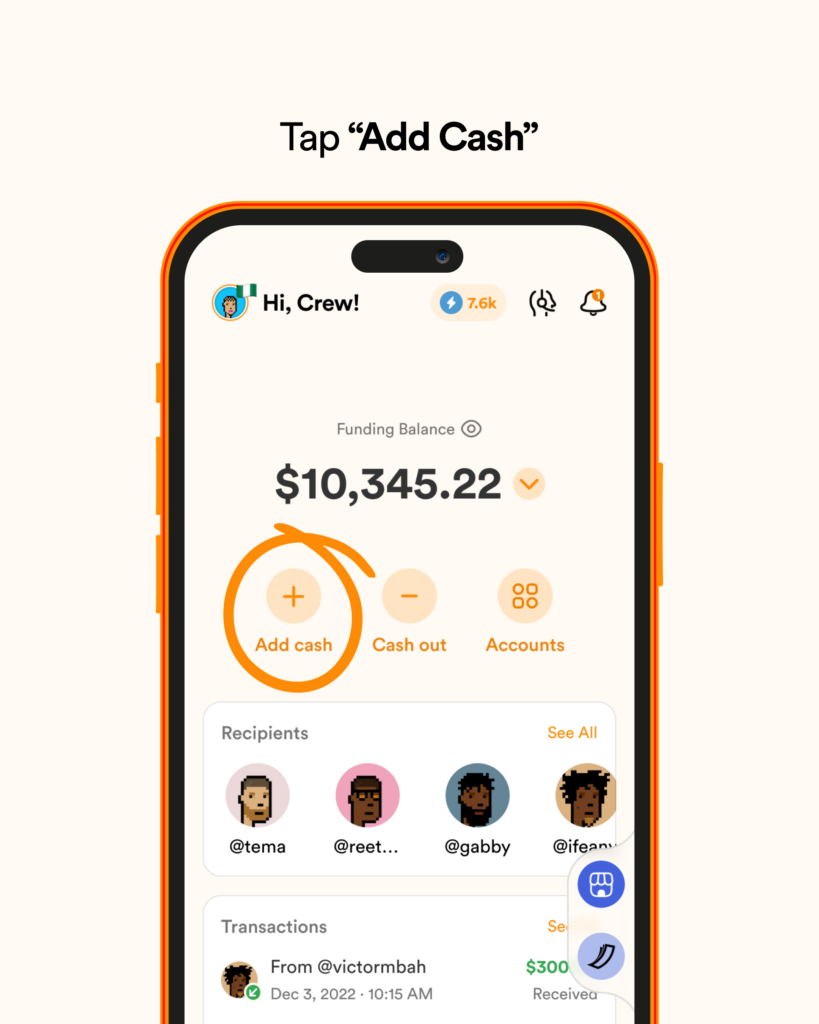
2. Tap “Add cash”
From the Home screen, tap deposit to view the available deposit options.
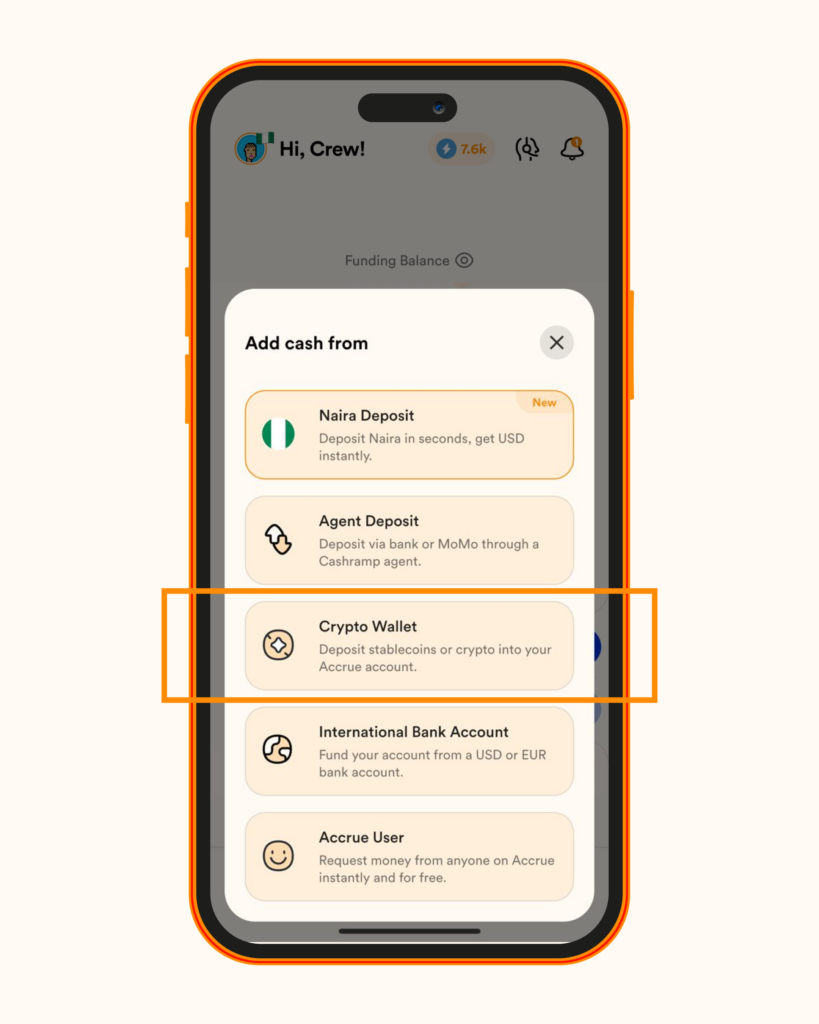
3. Select “Crypto Deposit”
Choose cryptocurrency deposit from the available options.
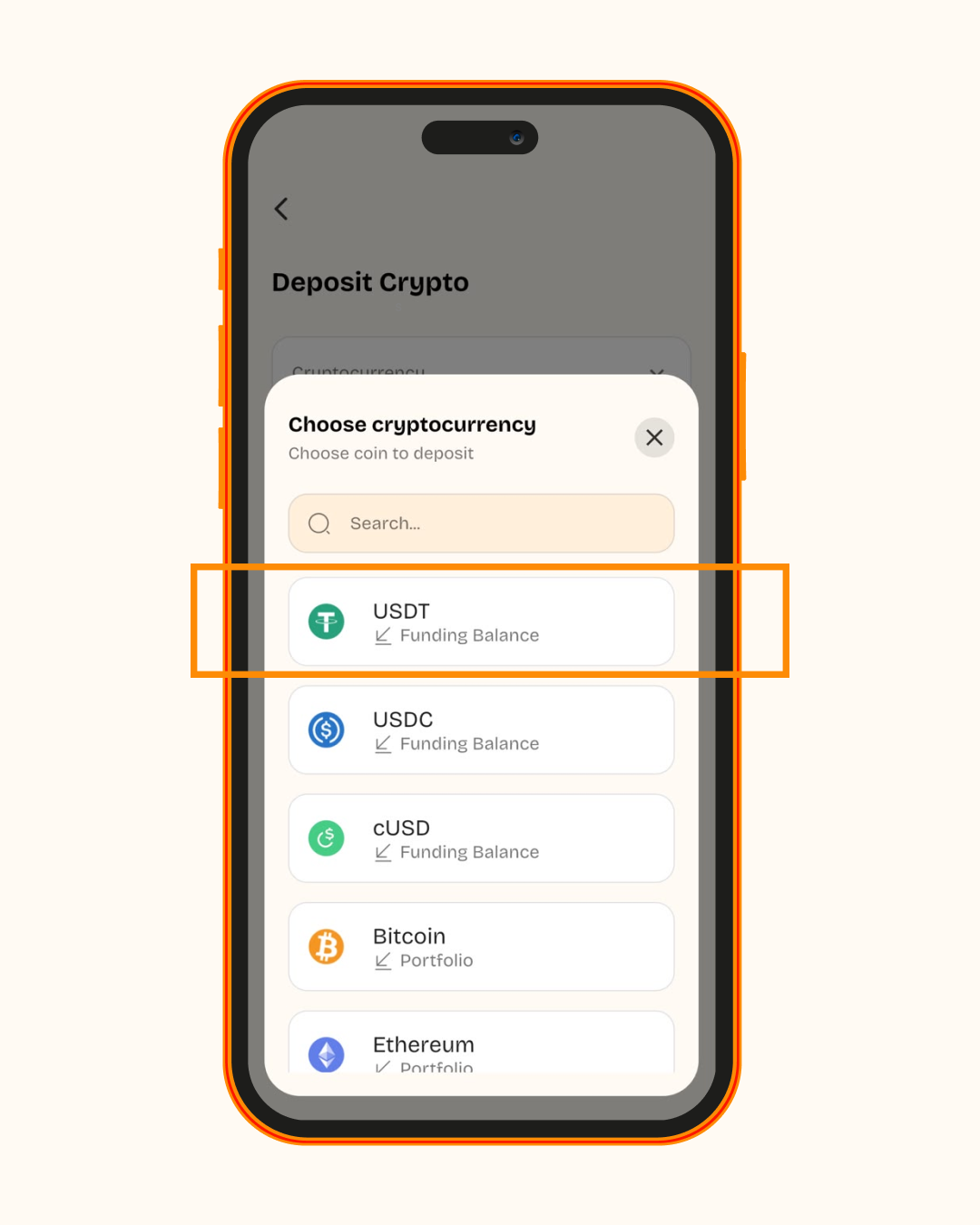
4. Select USDT
Under the cryptocurrency option, select:
5. Select the network
Next, select the network you want to use.
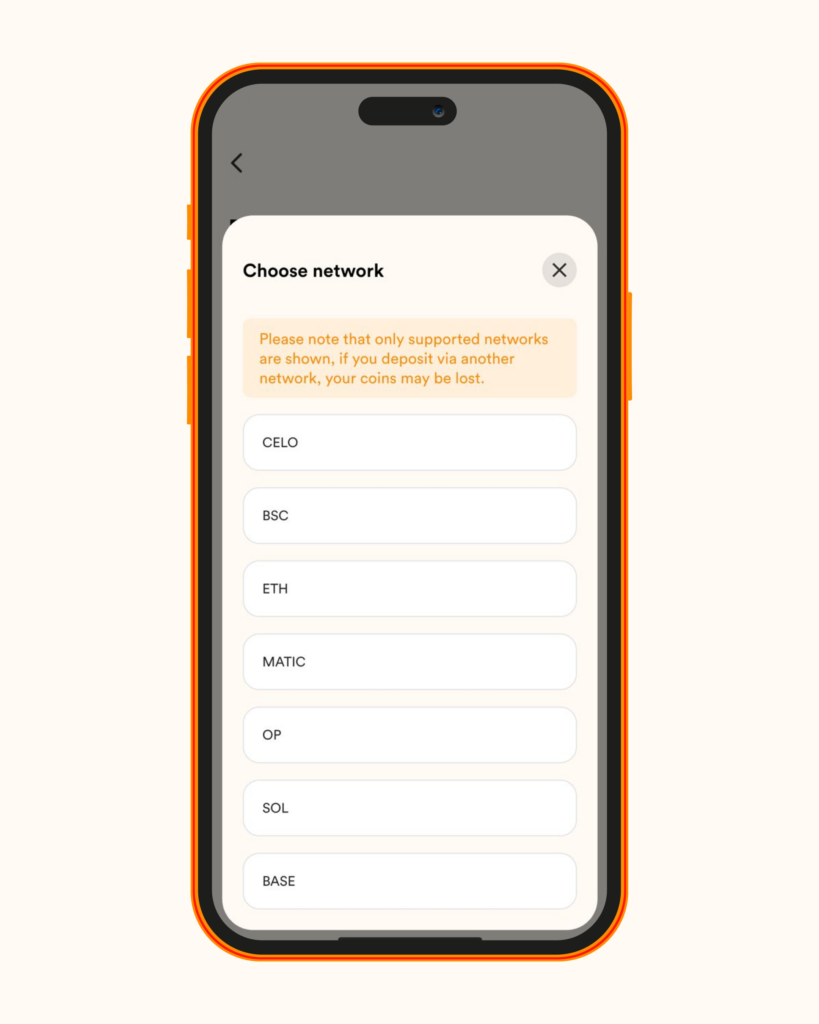
USDT is available across multiple blockchain networks, including Tron, Ethereum, Solana and others. Please note that you must use the same network you selected when generating your deposit address.
6. Copy your USDT wallet address
Once you select the network, your USDT deposit address will be displayed.
Tapand copy the address directly from the app.
Avoid typing the address manually. Crypto wallet addresses are long strings of characters, and a small mistake can send funds to the wrong destination.
7. Send the wallet address to the sender
Share your copied USDT wallet address with the person, business, exchange, or platform sending you the payment.
Before the sender confirms the transaction, make sure they are sending:
USDT
To the exact wallet address you provided
Using the same network you selected in Accrue
If you selected TRX on Accrue, the sender should also select the Tron/TRC-20 network when sending the USDT.
8. Wait for your deposit to reflect
Once the sender completes the transfer, the transaction will be processed on the blockchain.
USDT typically takes around 2–10 minutes to arrive, although the exact timing can depend on the transaction and network.
Once the deposit is received, it should appear in your Accrue Funding Balance.
How Long Does a USDT Deposit Take on Accrue?
USDT deposits can reflect within minutes once the transaction has been detected and processed.
However, blockchain transactions can sometimes take longer depending on network conditions, confirmation times, or issues with the sending platform.
If your deposit does not appear after the expected time:
Check that the sender used the correct wallet address.
Confirm that they selected the same network shown in Accrue.
Check the transaction status on the sending platform.
Check your Accrue transaction history.
Contact Accrue support if the transaction remains unresolved.
Common Mistakes to Avoid When Receiving USDT on Accrue
Receiving USDT is straightforward, but crypto transactions are generally irreversible once sent. Take a few seconds to verify the details before the sender confirms the transfer.
Using the wrong network
This is one of the most important things to check.
USDT can exist on different blockchain networks. For example, USDT can be issued on Tron, Ethereum, Solana and other networks.
If Accrue gives you a TRX network option, make sure the sender also chooses the corresponding Tron network when sending your USDT.
Never assume that two USDT addresses are interchangeable simply because they both say “USDT.”
Sending a different cryptocurrency
Make sure the sender is sending USDT, not another token.
Different cryptocurrencies can use similar-looking wallet addresses, but that does not mean they can be deposited into the same wallet.
Copying the wallet address incorrectly
Always copy the address directly from your Accrue app.
Do not type it manually, and check the address again before the sender confirms the transaction.
Sending before checking the network
Before sharing your address, tell the sender exactly which network to use. Always send USDT using the same network shown on your deposit screen.
Sending a large amount without checking first
If you’re receiving USDT from a new sender or platform for the first time, consider verifying the wallet address and network before sending a large payment.
For significant transfers, you may also want to confirm the transaction details with both parties before the transfer is initiated.
Ignoring the transaction history
If your USDT does not appear when expected, check your transaction history and the transaction status on the sending platform.
Pending transactions are not included in the available balance until the transaction is complete.
Start Receiving USDT on Accrue
Ready to receive USDT on Accrue? Open the Accrue app, go to deposit, choose the supported network, and copy your wallet address.
Once your deposit arrives, you can use your funds for supported withdrawals, swaps, virtual card funding, and other money-moving options available on Accrue.
Frequently Asked Questions About Receiving USDT on Accrue
Is there a minimum or maximum USDT deposit amount?
There is no minimum or maximum deposit amount, although fees may apply depending on the transaction or network.
How long does it take for my USDT deposit to reflect?
USDT deposits typically arrive within around 2–10 minutes after sending, although the exact timing can vary.
Can I use my USDT immediately after it is credited?
Once the USDT deposit is credited to your Funding Balance, you can use it for supported actions, including withdrawals, swaps, and virtual card funding.
Which network should I use to receive USDT on Accrue?
Always check the network displayed in your Accrue app before sending or receiving funds, as supported options can change.
What happens if I send USDT using the wrong network?
You should only send USDT using a network supported for your Accrue deposit address.
Using an unsupported or incorrect network can prevent the deposit from being credited and may result in loss of funds. Tether also warns users to carefully check the destination address and transport protocol when sending tokens across different networks.
Can I track my USDT deposit?
Yes. You can check your transaction history in Accrue for information about your deposit and its status. You can also use the transaction details provided by the sending platform to verify whether the transfer has been completed on-chain.
Can someone else send USDT to my Accrue wallet?
Yes. You can share your USDT deposit address with the person or platform sending you the payment. Make sure they send USDT using the exact network shown for your Accrue deposit address.
Is USDT the same as USD?
No. USDT is a blockchain-based digital token pegged 1:1 to the US dollar, but it is still a digital token that moves across blockchain networks rather than a traditional bank deposit.
Can I receive USDT and withdraw it in local currency?
Accrue supports crypto and fiat withdrawals, and its platform supports sending money across supported African countries. The available withdrawal options depend on your account and destination.
- Explainer on USDT ↩